Best Newsletter Software: Why Kit (ConvertKit) Wins
This article contains affiliate links. We may earn a commission on qualifying purchases at no extra cost to you. Our recommendations are independent and research-driven, and we say when a pick is not hands-on.
Kit (ConvertKit) is the best newsletter software for creators who sell something: courses, paid newsletters, templates, or sponsorships. It replaces the spreadsheet-plus-form setup with tagged subscribers, visual automations, and built-in product sales, so a signup can trigger a welcome sequence and a purchase without extra tools. This comparison weighs four things: how easily you can segment and automate, how reliably emails reach the inbox, what selling through the platform costs, and how much friction there is when you leave. It is written for solo creators, small publishers, and consultants, not for retailers who need heavy design templates.
| Role | Tool | Why |
|---|---|---|
| Pick | Kit (ConvertKit) | Strongest automation and creator-commerce tools for the effort |
| Runner-up | beehiiv | Growth and monetization features for publication-style newsletters |
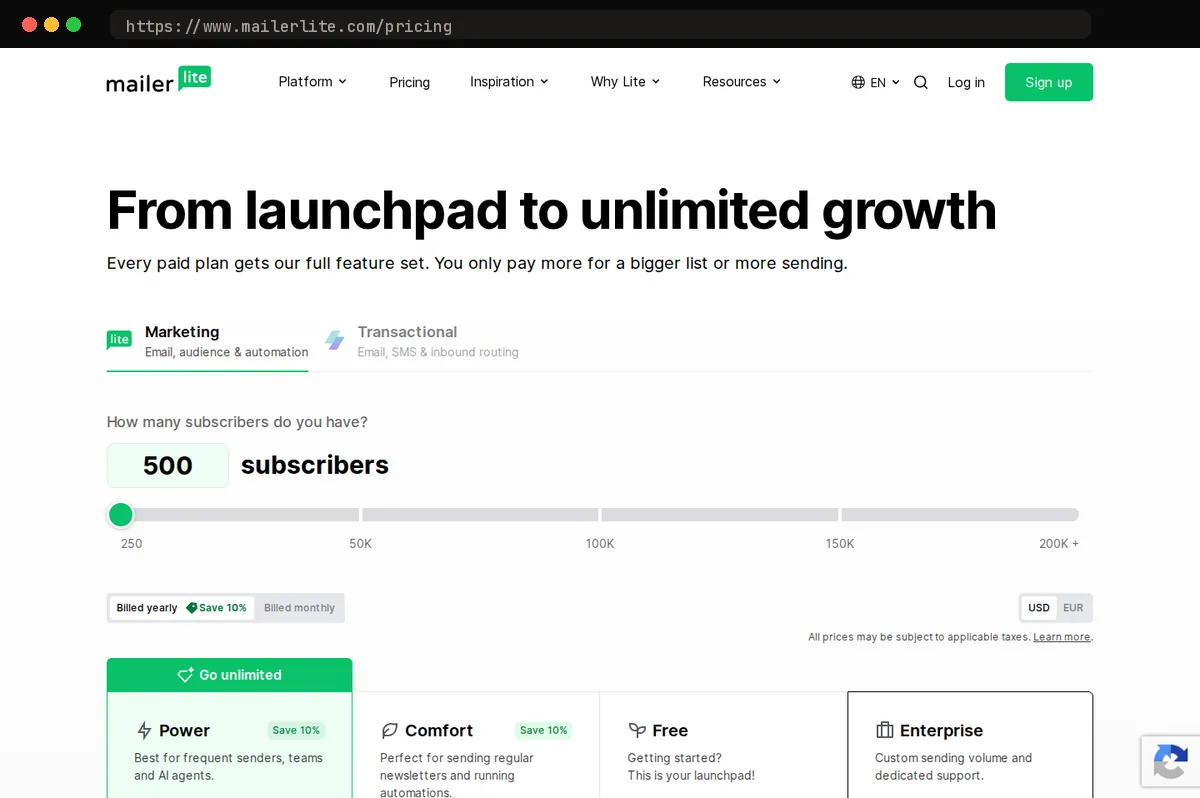
| Budget pick | MailerLite | The cheapest paid tiers here (from $12/month) with capable core features |
What newsletter software has to do for you
A creator sends a one-off blast from a generic email tool every other Friday. Everyone sits on one list, and nobody knows which issue earned which subscriber. Now give the same creator tagged, segmented subscribers and an automated welcome sequence. Each person carries a tag for the form or issue that brought them in, and the first week of every new relationship runs without anyone remembering to write it.
That difference comes down to three jobs the software has to do:
- Grow the list: landing pages and forms that record where each subscriber came from.
- Send reliably: solid deliverability and automations that fire on time.
- Turn subscribers into revenue: sell digital products or sponsorships, using segments that show who actually buys.
This guide is for solo creators, small publishers, and small teams selling digital products or sponsorships. Our pick, Kit (ConvertKit), is built for that audience. Enterprise marketing teams that need a full CRM should skip this guide.
Why Kit (ConvertKit) is the pick
Kit is built around how creators actually work: you have a handful of products, a few content themes, and an audience that moves between them. Most newsletter tools force each subscriber into a list. Kit uses tags instead. A reader who downloads your checklist, clicks a link about podcasting, and buys your course carries all three tags at once, so you segment by behavior rather than by which signup form they happened to use. That matters once your audience outgrows a single list.
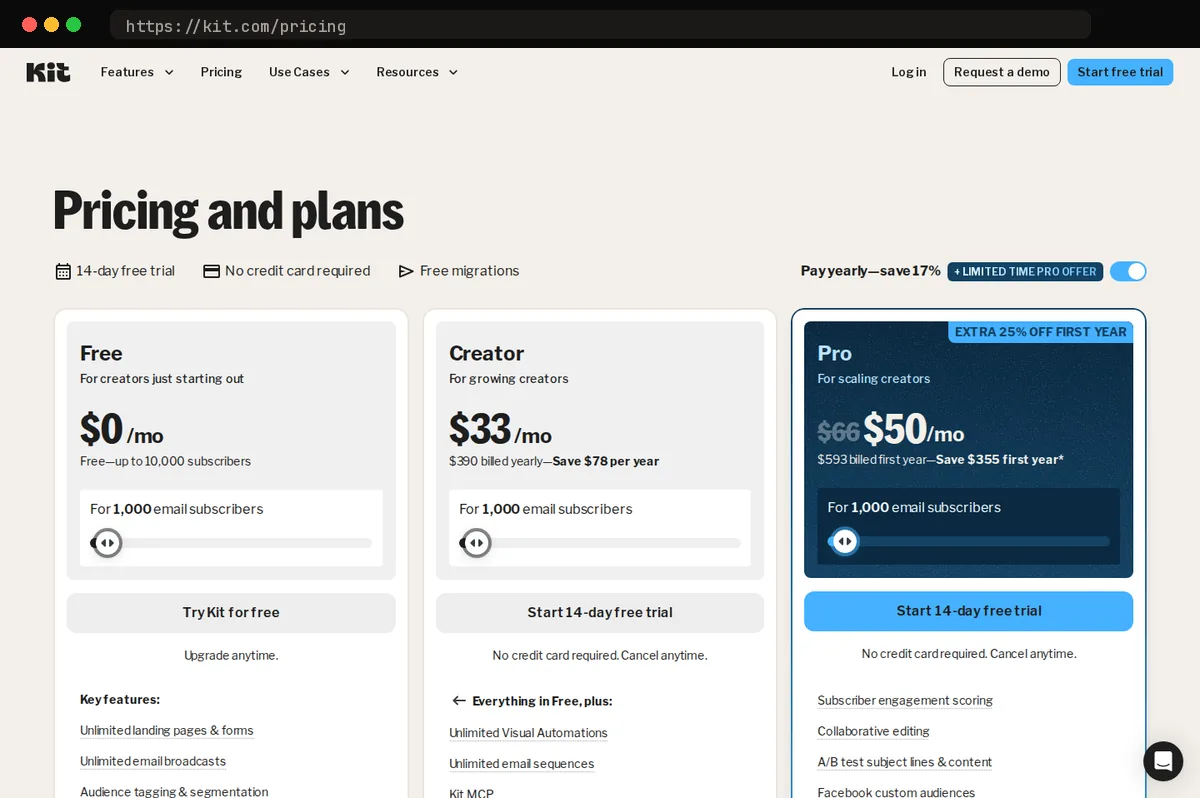
The visual automation builder is where those tags pay off. You map a sequence on a canvas: someone joins through a form, gets a welcome series, receives a different follow-up if they click a particular link, and is tagged when they finish. It's easier to audit than a stack of nested rules, and it lets a solo writer run a real onboarding flow without custom code. One thing to know before you sign up: visual automations and automated sequences are paid features. Kit's Free plan covers broadcasts, forms, landing pages, tagging, and selling; the Creator plan ($33 a month at 1,000 subscribers) unlocks automations and sequences.
Landing pages and signup forms are built in, so you can start collecting subscribers without a separate site. Kit also handles selling digital products and paid newsletters directly, which keeps your audience and your revenue in one place. It charges 3.5% plus 30 cents per sale on every plan, and that figure includes card processing (prices and limits in this guide were checked in October 2026).
For growth, the Creator Network and recommendations let other writers recommend your newsletter at signup, and you do the same for them. It's a way to grow through peers instead of paid ads.
Two caveats. Deliverability and ease of use are claims to test, not take on faith, so run a hands-on trial and send to a real segment of your list. And Kit's templates are plainer than design-led tools. That suits text-first newsletters well, but image-heavy publications will feel constrained.
Runner-up: beehiiv for growth-focused publishers
beehiiv fits publishers who treat the newsletter as a media business rather than a side channel for selling products. Its core tools are built around audience growth and ad revenue, and you get most of them without bolting on extra services.
The built-in website is the clearest example. Every issue can publish to a public, searchable archive, so back issues keep bringing in new readers through search. The referral program lets subscribers earn rewards for sharing, which turns your list into a distribution channel. The ad network tools help you match sponsors to your audience and run placements inside issues, which suits a sponsorship-led revenue model.
Choose beehiiv over Kit when sponsorships are your main income and a public archive is a real traffic source for you. If advertisers pay for reach and you want search to feed that reach, beehiiv's defaults point the right way.
It trails Kit in two places. Automation is shallower: if you rely on multi-step sequences, tag-based logic, and behavior-triggered email, Kit gives you more control. The learning curve is also steeper for creators who mainly sell their own courses, templates, or memberships. Kit's setup for landing pages, product delivery, and commerce is more direct, which is why it remains our pick for most creators.
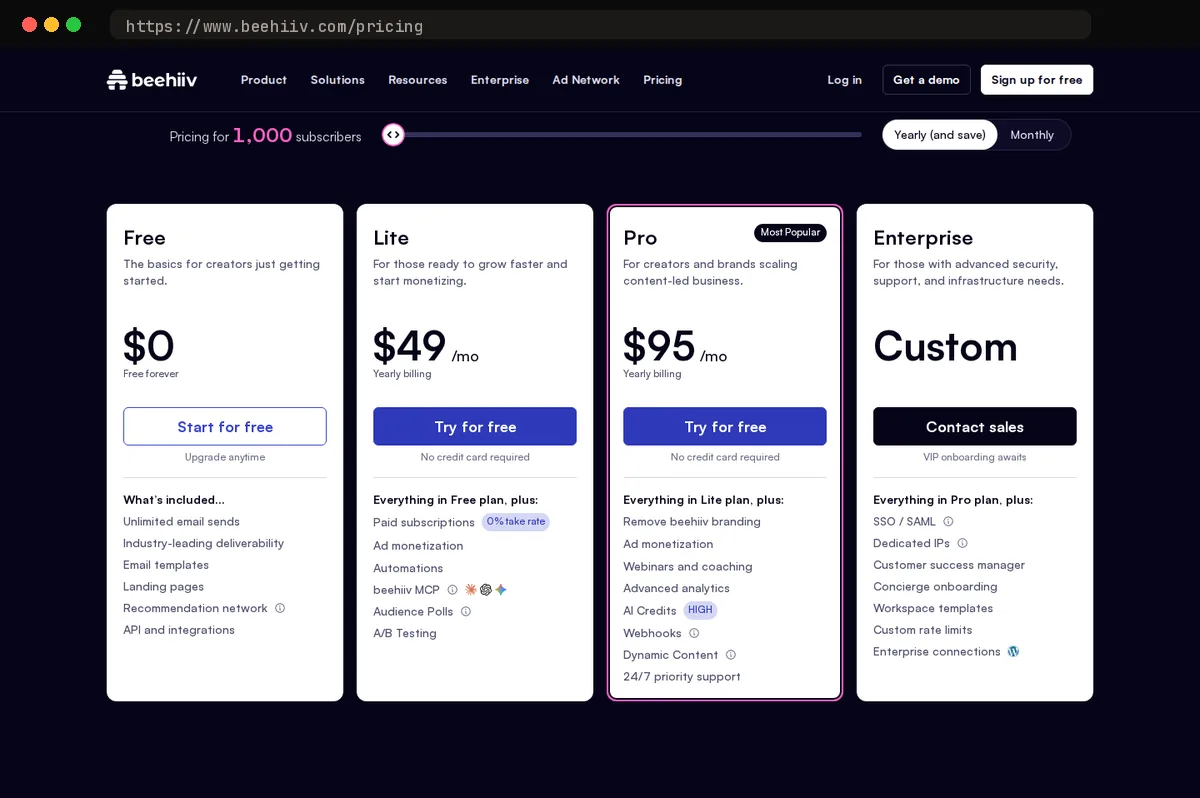
beehiiv's free plan covers up to 2,500 subscribers. The referral program, the ad network, and custom automations start on the Lite plan ($49 a month billed annually at 1,000 subscribers), which also takes 0% of paid-subscription revenue beyond Stripe's processing fee.
Budget pick: MailerLite for small lists and tight budgets
MailerLite is the pick when the budget is the constraint. Its free tier is small (250 subscribers and 2,500 emails a month), but its paid plans are the cheapest in this comparison: Comfort starts at $12 a month and Power at $25, and both scale with list size.
- MailerLiteComfortFree: plan: up to 250 subscribe…$12/moSmallest tier: up to 500 subscribers with 5,000 emails/month
- Kit (ConvertKit)CreatorFree: Newsletter plan: up to 10…$33/moOur pickPriced 'For 1,000 email subscribers'
- beehiivLiteFree: Launch plan: up to 2,500…$59/moUp to 1,000 subscribers at the displayed price
The drag-and-drop editor is clean and quick to learn. You can build a readable, good-looking issue without fighting the layout, which matters if you're a one-person operation with no designer. Basic automations hold up well too: a welcome sequence, a simple re-engagement flow, or tagging subscribers based on the link they clicked all work without much setup.
It fits three kinds of senders best:
- Hobbyists with a small list who want the lowest possible bill.
- Local businesses sending offers, event notices, or updates to a customer list.
- New newsletters that haven't proven revenue yet and shouldn't spend before they have to.
The tradeoffs are real. MailerLite has less creator-specific monetization than Kit, so selling paid products, running tip jars, or building a paid tier takes more outside tooling or manual work. It also lacks a recommendation network as strong as Kit's, which means you get less help growing your list through other creators' audiences.
If your newsletter is on track to become a business, Kit remains our recommended pick. If you're still testing whether anyone wants to read it, MailerLite keeps your costs low while you find out.
Other options worth a look: Substack and Mailchimp
Substack is the simplest way to start a paid, writer-first newsletter. You can publish your first issue in an afternoon. Paid subscriptions are built in, and its recommendations and network features can bring in readers without any promotion work on your part. If you want to write and have little interest in configuring software, that is a real advantage.
The tradeoffs are fees and control. Substack takes 10% of paid subscription revenue, and Stripe's processing fee (about 2.9% plus 30 cents per charge) comes on top of that. You also have less control over the subscriber relationship than you would on a tool built around your own list. Branding, automation, and segmentation are limited. Part of your audience arrives through the Substack network, not directly through you. Consider Substack if you are a writer testing whether readers will pay, and you value simplicity and discovery over flexibility.
Mailchimp is the familiar all-in-one marketing suite. It covers email, landing pages, audience management, and other marketing tools in one account. It makes sense for a business that already uses Mailchimp for its store, its contact lists, or its campaigns, and wants a newsletter in the same place.
Its creator workflows are less focused than Kit's, though. Selling paid content, tagging subscribers by interest, and building sequences around a creator's audience take more setup than in Kit, and the interface reflects a broad marketing product. That breadth helps a company running many channels. For an independent creator, it adds clutter.
Neither is our default recommendation. Kit remains the pick for most creators. Choose Substack or Mailchimp only when your situation matches the ones above.
How to choose and switch without losing subscribers
Choose by how you make money from the list. If you sell your own products, courses, or paid communities, choose Kit. Its tagging, automations, and checkout tools are built around selling to your own audience, which is why it's our pick for most creators. If advertising is your main revenue and you want fast audience growth, choose beehiiv. If you need the cheapest workable setup, choose MailerLite. If you want to write with built-in discovery and no setup, choose Substack.
Once you've picked, migrate in this order:
- Export your subscriber CSV from the old tool, including signup dates, tags, and any custom fields you segment on.
- Keep consent and unsubscribe status. Import only active subscribers. Carry over unsubscribes and bounces as suppressed contacts so no one who opted out gets mail from the new tool.
- Set up domain authentication on the new tool. Publish its SPF and DKIM records, then add a DMARC policy for your sending domain. Do this before your first send.
- Warm up gradually. Send first to your most engaged readers, such as recent openers and clickers. Then widen to the rest of the list over several sends, so mailbox providers see good engagement before volume rises.
Your next step: start a free trial of your pick, Kit if you sell products or courses. Build one signup form and one welcome email before you commit.
At a glance
| Tool | Strengths | Tradeoffs |
|---|---|---|
| Kit (ConvertKit) | Creator-focused tag-based segmentation; visual automations; landing pages and forms; sells digital products and paid newsletters; Creator Network and recommendations for growth. | Plainer email design options; automations and sequences need a paid plan; costs rise as the list grows. |
| beehiiv | Built-in website and archive; referral program; ad network and sponsorship tools; strong growth features for publishers. | Less depth in automation for product sellers; some advanced features sit on higher plans; newer ecosystem. |
| MailerLite | Cheapest paid tiers (from $12/month); clean drag-and-drop editor; solid basic automations and landing pages. | Small free tier (250 subscribers); fewer creator-specific monetization tools; weaker audience-growth network. |
| Substack | Fastest path to a paid writer-first newsletter; built-in discovery; no setup or tooling to manage. | Platform fee on paid subscriptions; limited automation and design control; less ownership of the audience relationship. |
| Mailchimp | Familiar all-in-one marketing suite; many integrations; good for businesses mixing newsletters with broader campaigns. | Less focused on creator workflows; pricing can climb with contacts; interface can feel crowded for simple newsletters. |
Bottom line
Kit is the pick for most newsletter writers. Its tagging and automation tools let you segment subscribers by what they click and send different follow-ups without rebuilding your list. Its paid products, sponsorship tools, and recommendation network are also built for creators who earn from their audience. If you are starting out, the Free plan covers up to 10,000 subscribers, so you can build a list before you pay; you'll need the Creator plan once you want automations.
The main caveat is cost. Kit's paid tiers rise as your list grows, and its email designs are plain compared with design-focused tools. If you send a heavily branded visual newsletter, test the templates first. Otherwise, start with Kit.
Related guides
Get started with Kit (ConvertKit)
This article contains affiliate links. We may earn a commission on qualifying purchases at no extra cost to you. Our recommendations are independent and research-driven, and we say when a pick is not hands-on.
Test Picked Editorial
Edited by Adam Ryan. Gear picks come from equipment running in his own homelab and workshop. Software picks are researched comparisons.


