Best cheap email marketing software: MailerLite leads
This article contains affiliate links. We may earn a commission on qualifying purchases at no extra cost to you. Our recommendations are independent and research-driven, and we say when a pick is not hands-on.
MailerLite is our pick for cheap email marketing software: its free plan covers up to 250 subscribers and 2,500 emails a month, and paid tiers start at $12 a month (Comfort plan, up to 500 subscribers) with a monthly send allowance of 10× the subscriber tier; unlimited sends start on the $25-a-month Power plan. Either way it undercuts most of the field without stripping out automation or landing pages. Prices checked October 2026.
This comparison is for solo operators, small teams, and bootstrapped stores that need real automation, a usable editor, and predictable pricing, not an enterprise suite. We weigh price per subscriber as a list grows, what the free tier actually permits, automation depth, deliverability reputation, and where each vendor charges extra. Our pick, runner-up, and budget pick are MailerLite, Brevo, and Moosend.
| Role | Tool | Why |
|---|---|---|
| Pick | MailerLite | the most automation and landing-page capability on a cheap plan |
| Runner-up | Brevo | send-based pricing makes big, rarely mailed lists nearly free |
| Budget pick | Moosend | lowest per-contact price that still includes real automation |
How the best best cheap email marketing software options compare
Prices checked October 2026. MailerLite is our pick for cheap email marketing because the free plan includes a visual automation builder, a website and landing page builder, and signup forms, and the paid plans keep per-subscriber cost low past the point where Mailchimp's Standard tier gets expensive. Brevo wins if you hold a big list and mail it rarely, since its pricing ignores contact count. Sender is the cheapest workable option for a side project. Moosend and Kit are credible alternatives: Moosend for its low entry price, Kit for creator-specific features like paid newsletters, though both trail MailerLite on included value. This comparison is research-driven, with hands-on testing limited to MailerLite and Brevo.
What cheap actually means in email marketing
The sticker price on a pricing page is the cheapest the tool will ever be. Three things decide whether it stays that way.
First, the billing unit. Most tools, including MailerLite, charge by subscriber count, so a list that never grows pays the same every month regardless of how often you send. A smaller group charges per email delivered. If you mail a 5,000-person list once a month, per-send billing is often cheaper; mail that same list three times a week and it can cost more than any subscriber-based plan. Count your real sends before comparing, not the sends you intend to make.
Second, tier spacing. Entry prices are quoted at the smallest list size, often 500 or 1,000 contacts. What matters is the price at the next two steps up, because a healthy list crosses them inside a year. Some vendors double the price between tiers; MailerLite's tiers run from 500 up to 200,000 subscribers on its pricing page, and the step between them felt gentler than most in our testing, which is a large part of why it is our pick. Price the plan at where your list will be in month six, not where it is today.
Third, what the cheap plan strips out. The common casualties are automation beyond a welcome sequence, landing pages, A/B testing, custom templates, and human support. A plan that lacks the feature you need is not cheap; it is a plan you will leave. Read the feature table row by row and note every item that only appears one column to the right.
MailerLite: the most complete toolkit at the low end
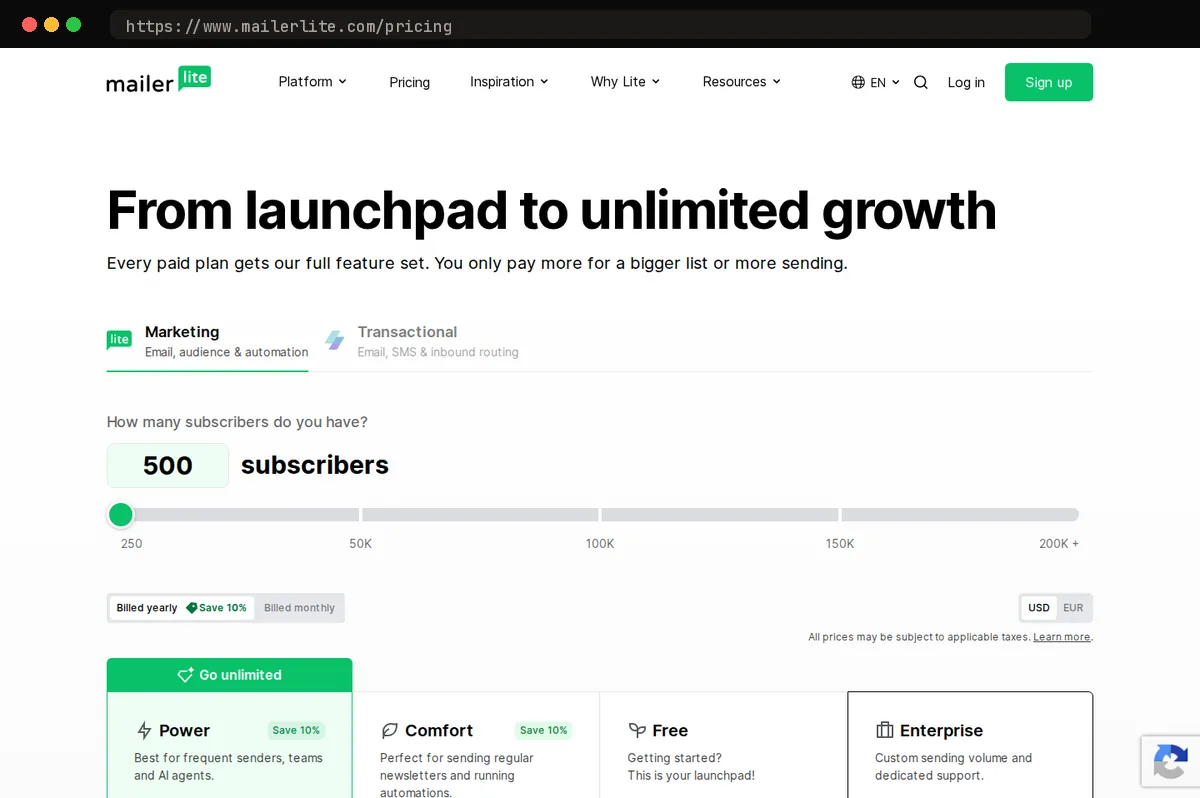
Our pick comes down to arithmetic. Most low-cost email tools make you choose: automation or a cheap plan, landing pages or a free tier. MailerLite puts the workflow builder, landing pages, forms, and the full drag-and-drop editor on its paid entry plan, Comfort (formerly Growing Business), starting at $12 a month for up to 500 subscribers; annual billing saves 10%. The free plan allows 250 subscribers and 2,500 emails a month, which is enough to run a real newsletter rather than a demo.
The workflow builder is visual and handles what a small list actually needs: welcome sequences, triggers on a signup or link click, conditional branches, and delays. It is not as deep as enterprise tools, but a typical lead-magnet-to-nurture sequence fits without workarounds. The editor is block-based with saved content blocks and a template library; it is quick to learn and produces clean mobile email without touching HTML. The site and landing page builder uses the same blocks, so a signup page, thank-you page, or basic one-page site lives in the same account and plan.
The limits worth knowing: the free plan trims features (multivariate testing, the full template library, dynamic content, and campaign auto-resend) and narrows support to the self-service knowledge base, after a 14-day trial of email and live chat. New accounts go through a manual approval review before you can send, and it can take longer than you expect, so sign up before you need to send. Reporting is lighter than Mailchimp's: per-campaign opens, clicks, and unsubscribes are covered, and MailerLite says its Shopify integration tracks the revenue each campaign brings in, but in our use the audience-level analysis is thinner.
None of this is a single standout capability. MailerLite wins on feature-to-price ratio: the most working tools on one cheap plan.
Brevo: pay for emails sent, not contacts stored
Brevo's pricing model is the opposite of most tools in this category: your bill tracks how many emails you send each month, and the size of your contact list barely matters. That single difference decides who should buy it.
Send-based pricing favors anyone who mails rarely relative to list size. An ecommerce store with a large but mostly dormant customer file, a nonprofit that sends a monthly update, or a consultant who emails a quarterly newsletter can keep every contact on file and pay only for the handful of campaigns they actually run. On a contact-priced tool, that same dormant list is dead weight you pay for every month.
The model turns against you once you send daily. A small, highly engaged list that gets a message every morning burns through send volume fast, and the per-email cost climbs well above what a flat contact-based plan would charge. Daily senders should price both ways before committing.
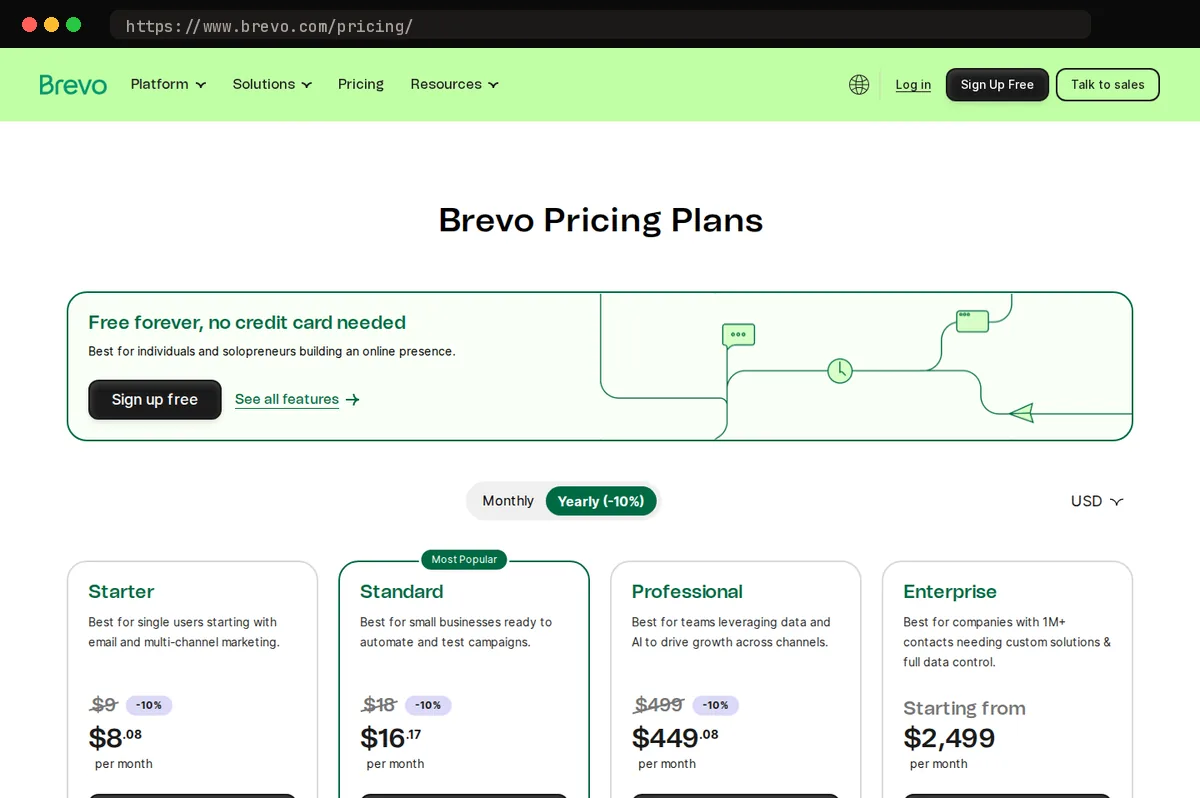
The free plan carries a daily send cap of 300 emails a day rather than a monthly pool, so you cannot bank unused days for a big launch, and free-plan emails carry a Brevo-branded footer. Paid plans start at $9 a month for 5,000 emails ($96.96 a year billed annually), and Brevo's help center indicates the daily cap lifts on paid plans; confirm it on the plan you pick.
Brevo also bundles transactional email, SMS, and a basic CRM, which MailerLite does not match. Its automation builder handles more complex branching and scoring than MailerLite's, but it is noticeably harder to learn. For most buyers, MailerLite's simpler builder is the better trade.
Moosend: lowest price for the automation you get
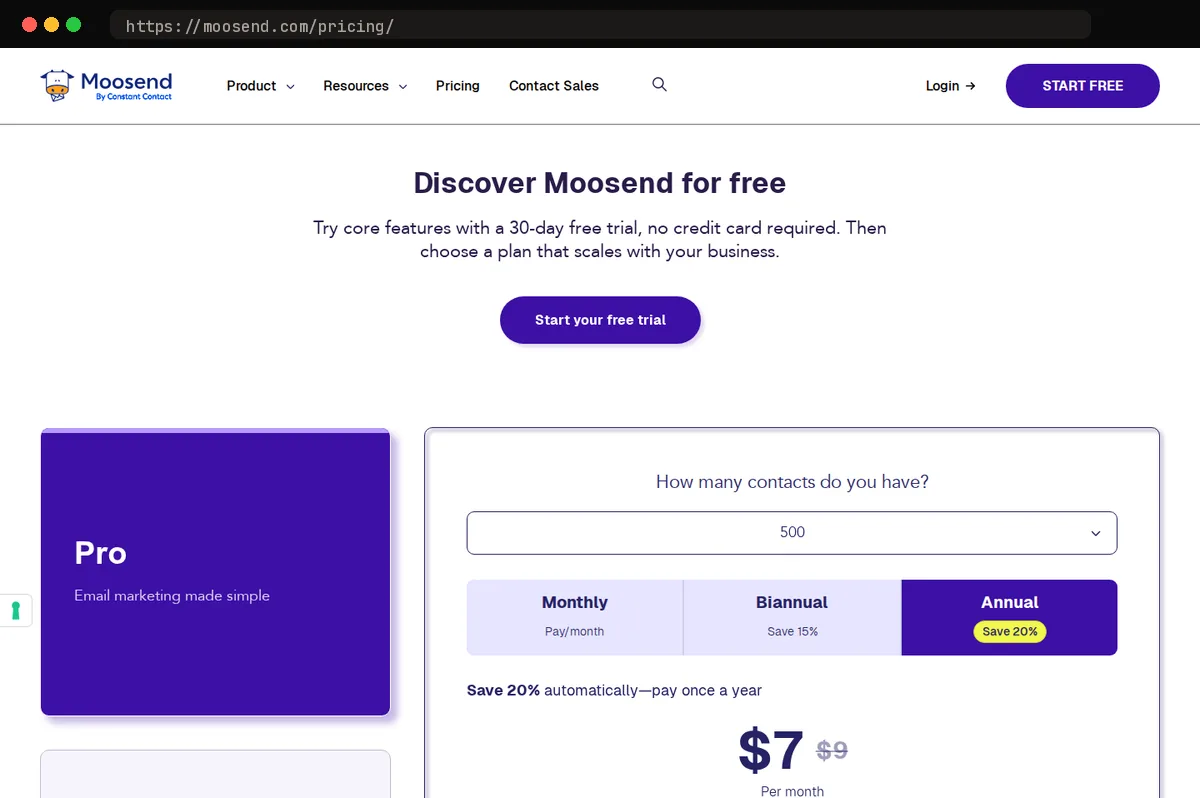
If your list is small and you want real automation without paying for it, Moosend is the cheapest way we found to get it. The Pro plan starts at $9 a month ($7 a month billed annually) for up to 500 contacts, and it stays under most competitors at every step up the per-contact ladder. For that, Moosend's pricing page lists email marketing automation, landing pages, and subscription forms on the Pro plan, and the product includes a drag-and-drop editor and prebuilt automation recipes. The core builder is not reserved for a higher tier, though the Moosend+ tier layers on enterprise add-ons such as custom reports.
- MoosendPro$9/moUp to 500 subscribers
- MailerLiteComfortFree: 250 subscribers, 2,500 em…$12/moOur pickUp to 500 subscribers
The tradeoffs are plain. There is no permanent free plan, only a 30-day trial, so if you were counting on sending for free until the list grows, MailerLite is the better fit. The integrations library is shorter than what Mailchimp or ActiveCampaign offer; the common ecommerce and CRM connections are covered, but niche apps will likely need a Zapier bridge or the API. The template catalog is also smaller, which matters more if you have no design help and want to start from something polished.
We rate Moosend the budget choice for a small list that needs drip sequences, triggered campaigns, and behavior-based segmentation rather than just broadcasts. Check the integrations list before you commit if a specific app connection is non-negotiable. Our overall pick remains MailerLite for its free plan and wider ecosystem; Moosend wins only on price per feature.
Mailchimp and Kit: when paying more is worth it
Neither tool beats MailerLite on price, and we don't rank either above it. But two kinds of buyer will outgrow a budget tool faster than they expect, and for them the premium is a fair trade.
Mailchimp earns its cost when reporting and integrations are the job. Its analytics go deeper than any budget tool: revenue attribution per campaign, comparative reports across sends, and audience insights that MailerLite only approximates. Its integration directory is also the broadest in the category, so if your stack includes an unusual CRM, booking system, or e-commerce platform, Mailchimp is the tool most likely to connect without middleware. The catch is the bill. The free plan now caps at 250 contacts and 500 emails a month (250 a day), pricing steps up sharply as your list grows, and on some tiers unsubscribed and non-subscribed contacts still count toward your billable total. Clean your audience monthly or you pay for people who left.
Kit (formerly ConvertKit) justifies its price when email is the product. Tag-based segmentation, visual automations, and a built-in paid-newsletter and digital-product stack let a creator sell without bolting on a separate checkout tool. Per subscriber it costs more than any budget tool in this roundup ($33 a month, or $390 a year, on the Creator plan at 1,000 subscribers), and the editor is intentionally plain, with minimal design options. If you write to sell courses, subscriptions, or ebooks, that tradeoff is worth it. If you send design-heavy product promotions, stay with our pick.
How to choose for your list size and sending habits
Start with how often you send, not how many features you want.
A small list that mails weekly is the case subscriber-based pricing was built for, and MailerLite is our pick here: the free plan's subscriber cap of 250 covers most new lists, and weekly sends stay well inside its monthly email allowance. Before importing, authenticate your sending domain (SPF, DKIM, and a DMARC record, which Gmail and Yahoo now expect from bulk senders) and confirm whether unsubscribed and bounced contacts are excluded from the billed count, since that is what separates a cheap plan from a quietly growing one.
A large list that mails once a month fits a per-email model better. Brevo prices by sends rather than stored contacts, so a big, quiet list costs little; check the daily send cap on its free tier and whether suppressed contacts still consume credits.
An ecommerce store needing abandoned-cart flows should test MailerLite's Shopify and WooCommerce integrations first; Omnisend is the alternative if you need deeper SMS and product-feed automation. Verify that the cart trigger fires from your actual checkout, not just a test order.
A creator selling to subscribers can run paid newsletters inside MailerLite through Stripe; Kit is the comparison point. Check import approval timelines, since new accounts are typically reviewed before the first send, and whether the vendor keeps billing inactive subscribers you have stopped mailing.
At a glance
| Tool | Strengths | Tradeoffs |
|---|---|---|
| MailerLite | Automation, landing pages, and forms included on the entry paid plan; usable free tier; clean editor; good deliverability record for the price | New accounts are reviewed before the first send; reporting is lighter than Mailchimp; free plan drops some features and live support |
| Brevo | Send-based pricing favors large, lightly mailed lists; transactional email, SMS, and a CRM bundled; capable automation workflows | Daily send cap and branded footer on the free plan; costs rise fast for daily senders; interface is busier than MailerLite |
| Moosend | Among the cheapest per-contact tiers; visual automation builder and landing pages on all paid plans; simple to learn | No permanent free plan, trial only; smaller integrations library and template catalog; fewer advanced reporting options |
| Mailchimp | Deepest analytics and A/B testing; largest integrations ecosystem; polished templates and brand recognition | Pricing climbs steeply with list growth; reduced free plan; can bill for unsubscribed and inactive contacts depending on tier |
| Kit | Built for creators and newsletters; strong tag-based segmentation; paid newsletters and digital product sales built in | Higher cost per subscriber than the budget tools; plain, text-first editor; limited value for ecommerce or B2B teams |
Bottom line
MailerLite is our pick for cheap email marketing. Its free plan covers a real list (up to 250 subscribers and 2,500 emails a month), automation and landing pages are included rather than gated behind a higher tier, and in our testing paid plans stayed on the inexpensive side as a list grows. The main caveat: MailerLite reviews every new account before you can send; it says approval usually takes under 15 minutes but can take longer if it asks for more information, so sign up ahead of a deadline rather than the afternoon you need to send. Brevo is the better choice if you are billed by sends rather than subscribers, and Sender is worth a look if you only need a bare-bones free plan. For most small teams, MailerLite is the one to start with.
Related guides
This article contains affiliate links. We may earn a commission on qualifying purchases at no extra cost to you. Our recommendations are independent and research-driven, and we say when a pick is not hands-on.
Test Picked Editorial
Edited by Adam Ryan. Gear picks come from equipment running in his own homelab and workshop. Software picks are researched comparisons.


