Best email marketing for nonprofits: MailerLite leads
This article contains affiliate links. We may earn a commission on qualifying purchases at no extra cost to you. Our recommendations are independent and research-driven, and we say when a pick is not hands-on.
MailerLite is our pick for nonprofit email marketing: its free plan covers a small donor list, paid tiers stay inexpensive as that list grows, and its automation and landing-page tools are enough for appeals, event invites, and volunteer onboarding without a dedicated marketing hire. Prices checked October 2026. This comparison is for development directors, communications staff, and volunteer-run organizations that send a few campaigns a month and need donor segmentation more than enterprise reporting. We weighed nonprofit discounts and plan limits at common list sizes, automation depth, deliverability controls, integrations with donor CRMs and payment tools, and how much time setup actually takes. Our research covered Mailchimp, Constant Contact, Brevo, Kit, and Benchmark alongside MailerLite; this is research-driven rather than a hands-on test of every tool.
| Role | Tool | Why |
|---|---|---|
| Pick | MailerLite | Nonprofit discount plus the easiest editor and automation a part-time coordinator can run alone |
| Runner-up | Constant Contact | Event hosting and payment collection on every plan, for organizations whose email calendar revolves around fundraisers |
| Budget pick | Brevo | Priced by monthly send volume (with contact caps that rise by tier), the cheapest model for large lists that email infrequently |
- BrevoStarterFree: 300 emails per day$9/moFrom 5,000 emails per month, email & SMS, no daily sending…
- MailerLiteComfortFree: 250 subscribers, 2,500 em…$12/moOur pickUp to 500 subscribers, 5,000 monthly emails
How the best email marketing for nonprofits options compare
| Tool | Why | |
|---|---|---|
| Our pick | MailerLite | Free tier, nonprofit discount on paid plans, automation without an upsell |
| Runner-up | Constant Contact | Event hosting and payment collection built in |
| Budget pick | Brevo | Charges by emails sent, with contact caps that rise by tier |
Prices checked October 2026. Our pick is MailerLite: its free plan covers up to 250 subscribers, registered nonprofits get 30% off paid plans, and its automation builder handles welcome series and donor follow-ups on the entry tier rather than a premium one. Mailchimp is the name most boards recognize and offers its own nonprofit discount of 15% on paid marketing plans, but contact-based pricing climbs quickly once a donor list passes a few thousand records. Constant Contact earns runner-up for small organizations that run events: its pricing page lists event hosting and payment collection on every plan, and prepaid plans carry a nonprofit discount of 20% for a six-month prepay or 30% for a 12-month prepay; monthly billing gets no discount. Brevo is the budget pick for groups with a large but rarely mailed list, since it bills on send volume. This comparison is research-driven, built from vendor documentation and current plan pages rather than a full hands-on trial of every tool.
What nonprofits actually need from an email tool
A retailer's list is one audience that buys. A nonprofit's list is at least three audiences that behave nothing alike. Donors open two or three emails a year and expect to be thanked, not sold to. Volunteers need shift reminders and operational updates on short notice. Board members want a quarterly digest and little else. Sending the same cadence to all three is how a small shop earns unsubscribes from the people it can least afford to lose.
That shifts the feature priorities. Segmentation by relationship type, simple tagging, and a clean way to move someone from "volunteer" to "donor" matter more than abandoned-cart flows or revenue attribution. A nonprofit discount matters more than enterprise reporting, because the budget line for email is usually measured against printing costs, not ad spend.
The other constraint is staffing. The person sending the newsletter is usually also running the gala, so the right tool is one a part-time communications coordinator can run without a designer or a developer. Templates should look finished out of the box, forms should embed without touching code, and the editor should not punish a quick edit on a Friday afternoon.
Cost also has to stay flat as the list grows past the first few thousand subscribers, since list growth rarely tracks revenue growth at a nonprofit. We weighted all of this toward MailerLite, which handles segmentation and a nonprofit discount of 30% without pushing you onto a tier built for an ecommerce team.
Why MailerLite is the pick
MailerLite wins on the combination a small nonprofit feels every month: a clean drag-and-drop editor, a discount for registered nonprofits, and pricing that stays low as the list grows. The free plan allows up to 250 subscribers and 2,500 emails a month, which is enough for a brand-new organization to start sending the week it incorporates. Registered 501(c)(3)s and their equivalents get 30% off paid plans, and the Comfort tier (formerly Growing Business) starts at $12 a month.
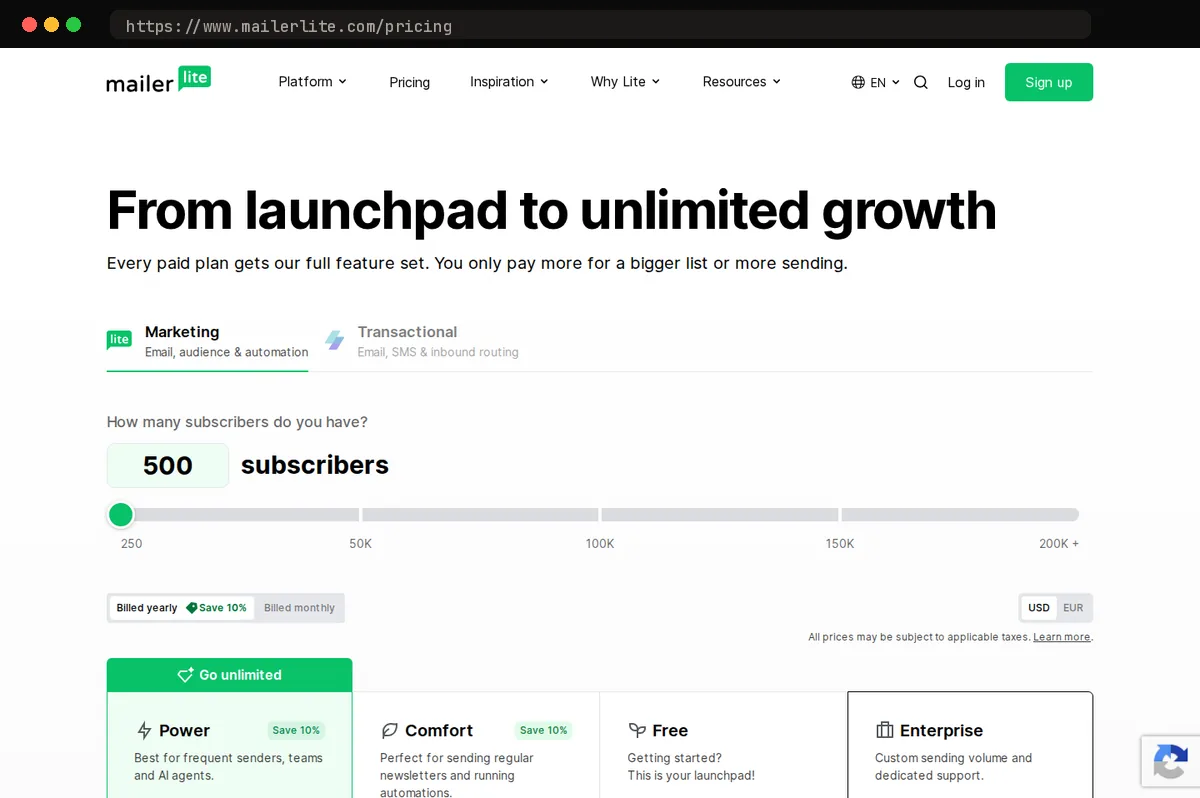
The automation builder covers the flows that matter here: welcome a new subscriber, thank a donor, re-engage one who has gone quiet. It does this with plain triggers and steps rather than the branching Marketing Automation Flows in Mailchimp, which is a relief for the volunteer who inherited the account and has an hour a week to run it. Landing pages, signup forms, and a basic website builder are included, so an appeal page can live inside the same tool instead of a separate subscription.
Deliverability is consistently strong across the independent inbox-placement reports we reviewed; this is a research-driven judgment, not a hands-on test of our own.
The trade-offs are real. MailerLite's integration catalog is thinner than Mailchimp's, and there is no native event management. An organization that runs registrations in a separate event platform or tracks gifts in a donor CRM should check MailerLite's integration catalog first: the vendor's nonprofit page says donors can be imported from a spreadsheet or connected from an existing CRM, but it does not name which systems connect natively, and a third-party connector adds a monthly cost and one more thing to maintain. If most of your list activity starts in a donor database, weigh that step before you commit.
Mailchimp: the biggest name, with the biggest bill
Mailchimp earns its place in this comparison on one strength: integrations. If your donor CRM, payment processor, or volunteer scheduling platform already pushes contacts and gift data into Mailchimp, that plumbing is real work to rebuild, and none of the other three tools we tested matches the breadth of its connector library. Its reporting and A/B testing are also the most mature of the group, and the nonprofit discount of 15% applies to paid plans.
The problems are structural, not cosmetic. Pricing scales with contact count, and Mailchimp counts unsubscribed and non-subscribed contacts against your limit. A nonprofit that imports ten years of event attendees ends up paying for people it cannot legally email. The free plan has shrunk repeatedly and now caps at 250 contacts and 500 sends a month (no more than 250 a day). Automation flows on the Essentials plan are capped at four steps, so the expanded multi-step flows and flow templates that matter most for donor stewardship start at the Standard plan at $20 a month for up to 500 contacts. The editor has also grown heavier with each redesign rather than lighter, which slows down volunteers who send a newsletter once a month.
Mailchimp is the right call for a mid-sized nonprofit with a dedicated marketing hire and existing integrations worth protecting. For everyone else, it is an expensive default, and MailerLite delivers the sending, segmentation, and automation most organizations actually use at a fraction of the cost.
Constant Contact: built for events and local chapters
Constant Contact is our runner-up because it bundles things the other three tools mostly leave to add-ons: its pricing page lists event hosting, product sales, and payment collection on every plan, and the vendor promotes surveys and social posting from the same dashboard. One caveat from Constant Contact's own community forum: the newer event tool has no dedicated donation field, so collecting a gift at registration means setting up a fixed-amount ticket as a workaround. If your email calendar is organized around a spring fundraiser and a fall volunteer drive, that consolidation replaces at least one separate event platform and the glue work of syncing attendee lists back into your contacts. It also publishes a nonprofit prepay discount of 20% off a six-month prepay or 30% off a 12-month prepay (no discount on monthly billing), for organizations that submit a federal 501(c)(3) or 501(c)(6) determination letter, and phone support is available by most accounts, though we could not confirm from the vendor's pages which plans include it; that matters more than it sounds when the volunteer running email turns over every year and the new person needs a human on the line, not a help-center article.
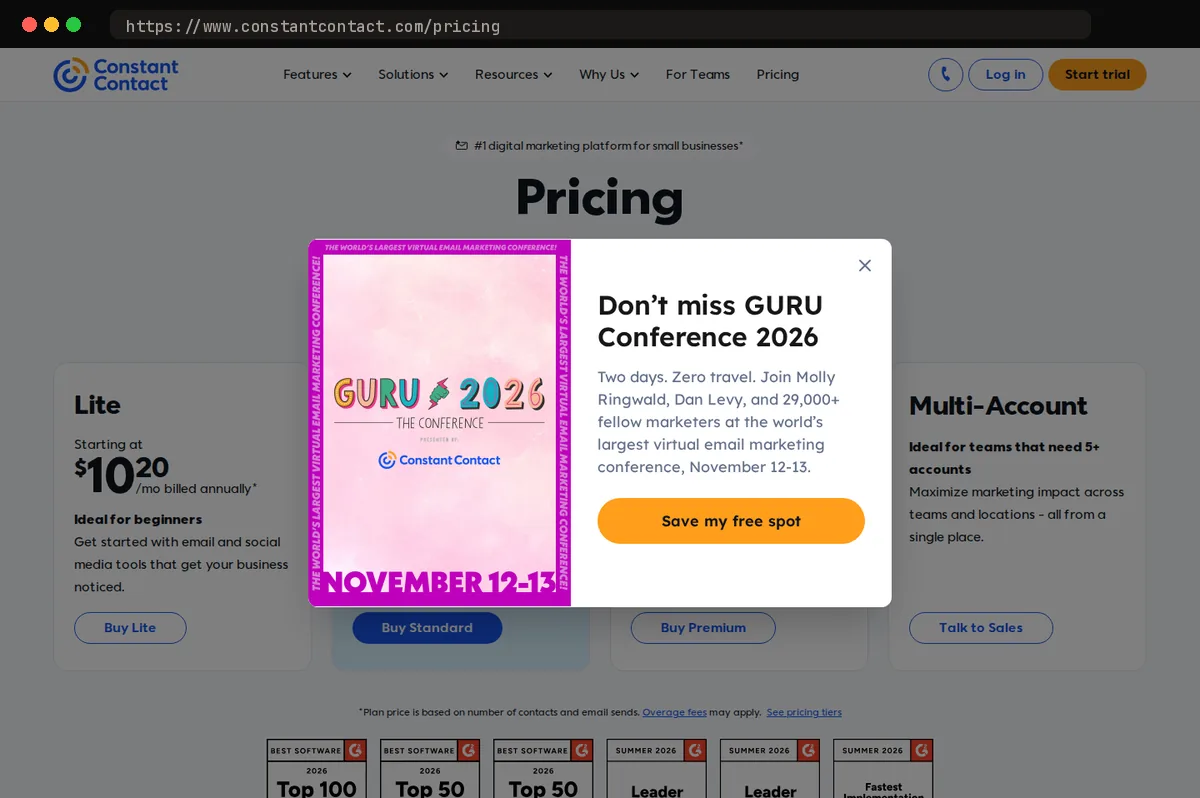
The tradeoffs are real. The template library looks dated next to MailerLite's, and the automation builder is less flexible: simple welcome series and date-based reminders work fine, but branching on subscriber behavior gets awkward. Pricing is per contact and climbs faster than MailerLite's at the same list size; the entry Lite plan is inexpensive for a small list, but a list of a few thousand donors lands on a tier where MailerLite is noticeably cheaper.
Our rule: choose Constant Contact when events are the center of your program and you want registration, payment, and follow-up in one place. If you mainly send newsletters and appeals, MailerLite does that job better for less, and the event features you would be paying for go unused.
Brevo: pay for sends, not subscribers
Brevo prices its plans on how many emails you send each month, and each volume tier also caps how many marketing contacts you can store, with the cap rising as the email tier does. That inverts the math for a particular kind of nonprofit: the alumni association with a large list it emails quarterly, the membership organization that sends renewal notices twice a year, the food bank that writes to its full donor base around the holidays and the spring drive. On a contact-based plan, those organizations pay year-round for subscribers they rarely message. On Brevo, they pay for the campaigns they actually send. The free plan allows 300 emails per day and includes up to 100,000 contacts, and the Starter plan begins at $9 a month for 5,000 emails a month with a 500-contact cap at that tier; higher Starter and Standard volume tiers allow up to 500,000 contacts.
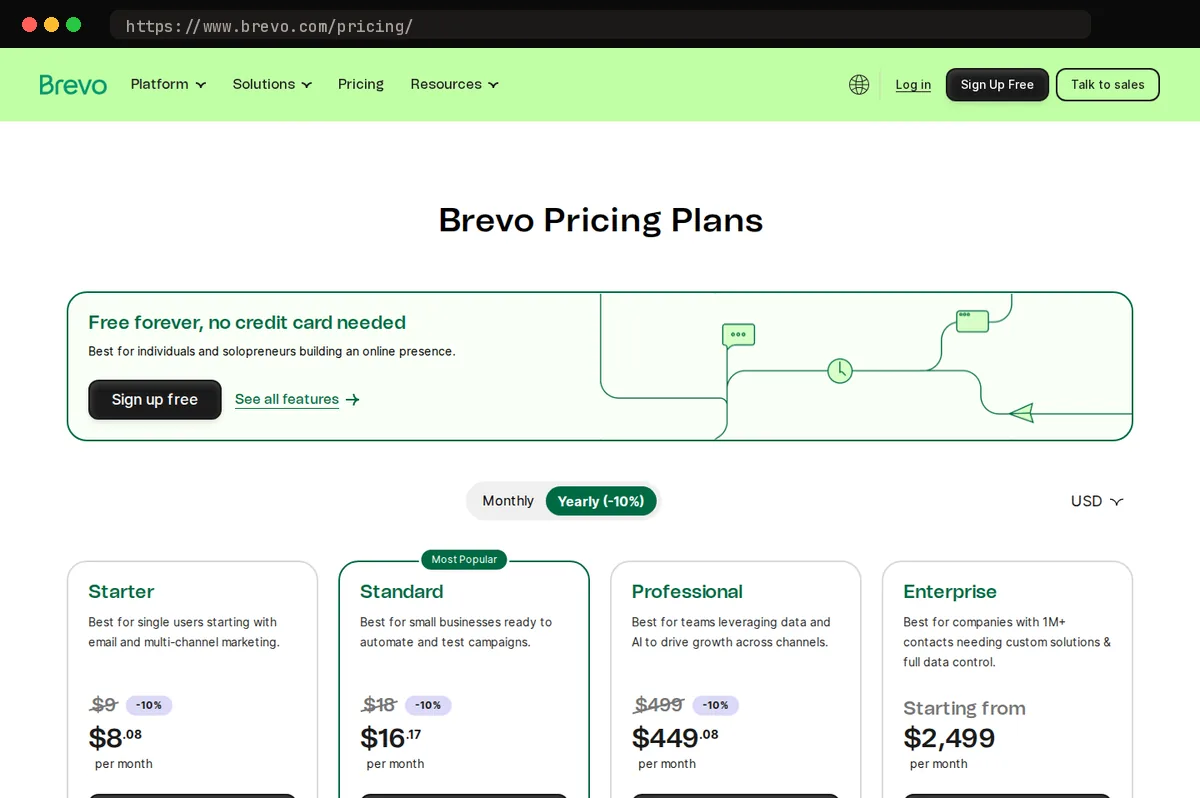
Brevo also bundles transactional email, SMS, a lightweight CRM, and live chat. Donation receipts and event confirmations can go out from the same account instead of a second service, and the CRM can track donor conversations without another subscription.
The tradeoffs are real. The campaign editor is less polished than MailerLite's, the interface takes longer to learn, and because the shared sending infrastructure also carries transactional mail, keeping your sender reputation clean falls more on you: authenticate your domain, warm up new lists, and prune bounces promptly.
Brevo is our budget pick for organizations where list size, not send volume, drives the bill. If you email weekly, the savings shrink and MailerLite remains the better all-around choice.
How to decide and how to switch
Start with two numbers from your own account: how many contacts you hold and how many emails you sent in a typical month. Divide sends by contacts. If the ratio is under two, you are paying to store a list you rarely mail, and Brevo's volume-based pricing will almost always beat contact-based plans. If events and donations run through email, price Constant Contact against your current event platform rather than against the other email tools, because the registration and ticketing it replaces is where the real cost sits. Everyone else should default to MailerLite: its automation, forms, and landing pages cover what a small development team actually uses, and the nonprofit discount of 30% keeps the bill reasonable as the list grows.
Whichever you pick, migrate deliberately. Export subscribers with their original consent date and signup source, not just name and address; you will need both if a complaint or a privacy request ever lands. Before the first send from the new platform, suppress anyone who has not opened in two years. Reactivating them later is fine, but mailing them on day one tells inbox providers your new sender is spraying a stale list. Then warm up the new domain over the first few campaigns, starting with your most engaged segment and widening from there, rather than blasting the full list at once.
Every tool here imports a CSV in minutes. The deliverability reputation you build afterward is what takes months, and it does not transfer with the file.
At a glance
| Tool | Strengths | Tradeoffs |
|---|---|---|
| MailerLite | Nonprofit discount; clean editor and simple automation; landing pages, forms, and site builder included; generous free tier; pricing stays low as the list grows | Smaller integration catalog; no native event or donation tools; approval process for new accounts can take a day |
| Mailchimp | Largest integration library; mature reporting and A/B testing; nonprofit discount on paid plans; widely known, so volunteers often already know it | Bills for unsubscribed and non-subscribed contacts; Essentials automation flows capped at four steps, longer flows need Standard; free plan keeps shrinking; most expensive of the four at scale |
| Constant Contact | Event hosting and payment collection on every plan; surveys and social posting promoted by the vendor; published nonprofit prepay discount; phone support | Dated templates; less flexible automation; per-contact pricing climbs quickly; weaker landing-page tooling; no dedicated donation field in the newer event tool |
| Brevo | Priced on send volume, with contact caps that rise by tier; bundles transactional email, SMS, CRM, and chat; strong fit for large, low-frequency lists; 20% nonprofit discount on paid plans, requested through support with proof of status | Less polished editor; steeper learning curve; shared infrastructure puts more deliverability management on you |
Bottom line
For most nonprofits, our pick is MailerLite. Its free plan covers up to 250 subscribers and 2,500 emails a month, paid tiers start at $12 a month, and the automation builder, landing pages, and embedded forms are strong enough that a small team can run donor newsletters, event reminders, and volunteer onboarding without a second tool. We confirmed the nonprofit discount: 30% off paid plans.
The main caveat: MailerLite is not a donor CRM. It will not track gifts, pledges, or giving history, and its native integrations with fundraising platforms are thinner than what Constant Contact or Mailchimp offer. If your email list has to stay in sync with a donor database, confirm the integration works before you commit.
Related guides
This article contains affiliate links. We may earn a commission on qualifying purchases at no extra cost to you. Our recommendations are independent and research-driven, and we say when a pick is not hands-on.
Test Picked Editorial
Edited by Adam Ryan. Gear picks come from equipment running in his own homelab and workshop. Software picks are researched comparisons.


