MailerLite vs Mailchimp: why MailerLite wins for most teams
This article contains affiliate links. We may earn a commission on qualifying purchases at no extra cost to you. Our recommendations are independent and research-driven, and we say when a pick is not hands-on.
MailerLite is our pick over Mailchimp for most teams: it covers the core work of campaigns, automations, forms, and landing pages at a lower cost per subscriber, with a simpler editor and fewer surprises on the bill as a list grows. Prices checked October 2026. This comparison is for small businesses, creators, and lean marketing teams who send regular newsletters and run a handful of automations, not enterprises that depend on Mailchimp's deeper ecommerce reporting and larger integration catalog. We weigh pricing at common list sizes, automation depth, editor quality, deliverability tooling, integrations, and support, and we point out where Mailchimp still has the edge. Our verdict is research-driven, based on current plan documentation and published feature lists rather than a side-by-side test.
| Role | Tool | Why |
|---|---|---|
| Pick | MailerLite | best balance of editor speed, included automation, and fair pricing as the list grows |
| Runner-up | Mailchimp | deepest integration catalog and familiarity, if you can stomach the contact billing |
| Budget pick | Brevo | unlimited contacts billed by send volume, plus CRM and transactional email in one account |
How the best MailerLite vs Mailchimp options compare
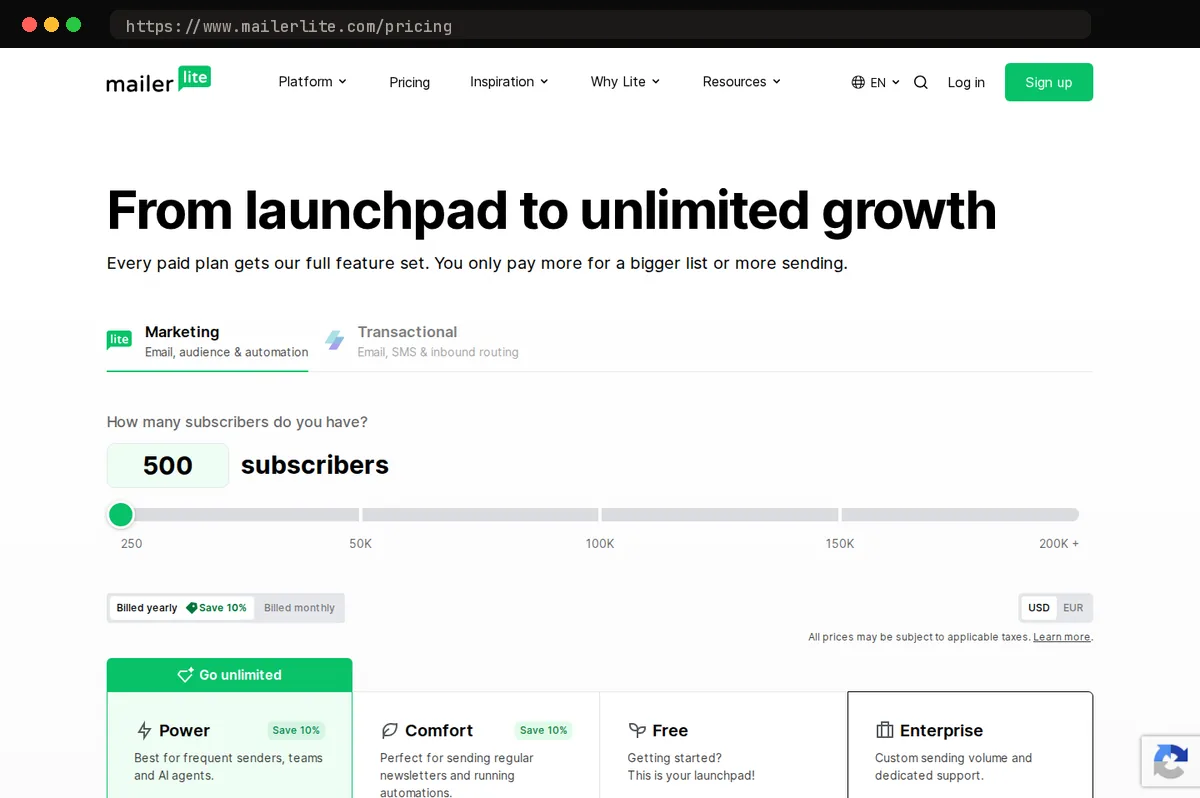
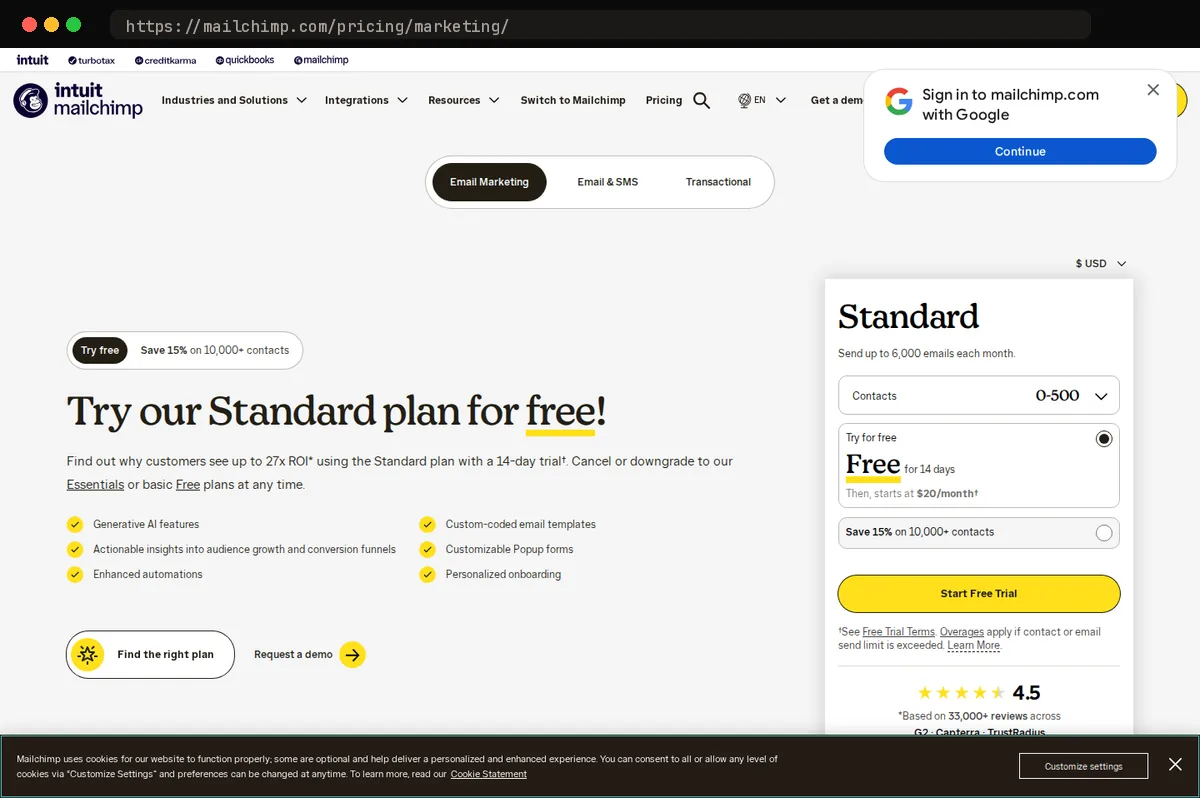
Prices checked October 2026. Our pick is MailerLite. Both products cover the same core job: newsletters, automations, signup forms, and landing pages. They split on cost and complexity. MailerLite keeps multi-step automations, landing pages, and a clean drag-and-drop editor on its free plan, up to 250 subscribers; the Comfort plan (formerly Growing Business) starts at $12/month, and Power (formerly Advanced) at $25/month; annual billing saves 10%. Mailchimp's free plan is tighter (250 contacts and 500 sends a month, capped at 250 a day), and its most useful segmentation and reporting sit behind the Standard tier (Mailchimp's pricing page lists a promotional $20/month for the first 12 months at 500 contacts, with a higher regular rate after that), so costs climb faster with audience size. Mailchimp's advantages are real: a much larger native integrations directory, more mature e-commerce reporting, and name recognition that eases buy-in from a marketing team. Pick Mailchimp if those matter more than price. A technical buyer comfortable connecting tools through Zapier or the API gets the same results from MailerLite for less.
Who this comparison is for
If you run a small B2B team, market solo, or manage email for a handful of agency clients, this comparison was written for your decision. You need one platform for newsletters, a few nurture sequences, and basic automation like welcome series and tagged follow-ups, and you want to stop paying for seats and features you never touch.
We put MailerLite against Mailchimp head to head because those are the two names on almost every shortlist. We also cover Brevo and Kit, because in our experience they are the alternatives buyers most often cross-shop: Brevo when transactional email or SMS is part of the picture, Kit when the sender is a creator selling a newsletter or digital product.
This is also a good fit if you are replacing a platform, not just buying your first one. Teams leaving Mailchimp over cost per contact or audience structure, and agencies consolidating clients onto one tool, will find the migration and pricing sections most useful.
Who should look elsewhere: enterprise marketing-ops teams that need multi-brand governance, role-based approval workflows, or a dedicated customer data platform feeding segmentation. None of the four tools here is built for that, and we do not pretend otherwise.
Pricing models and how costs scale
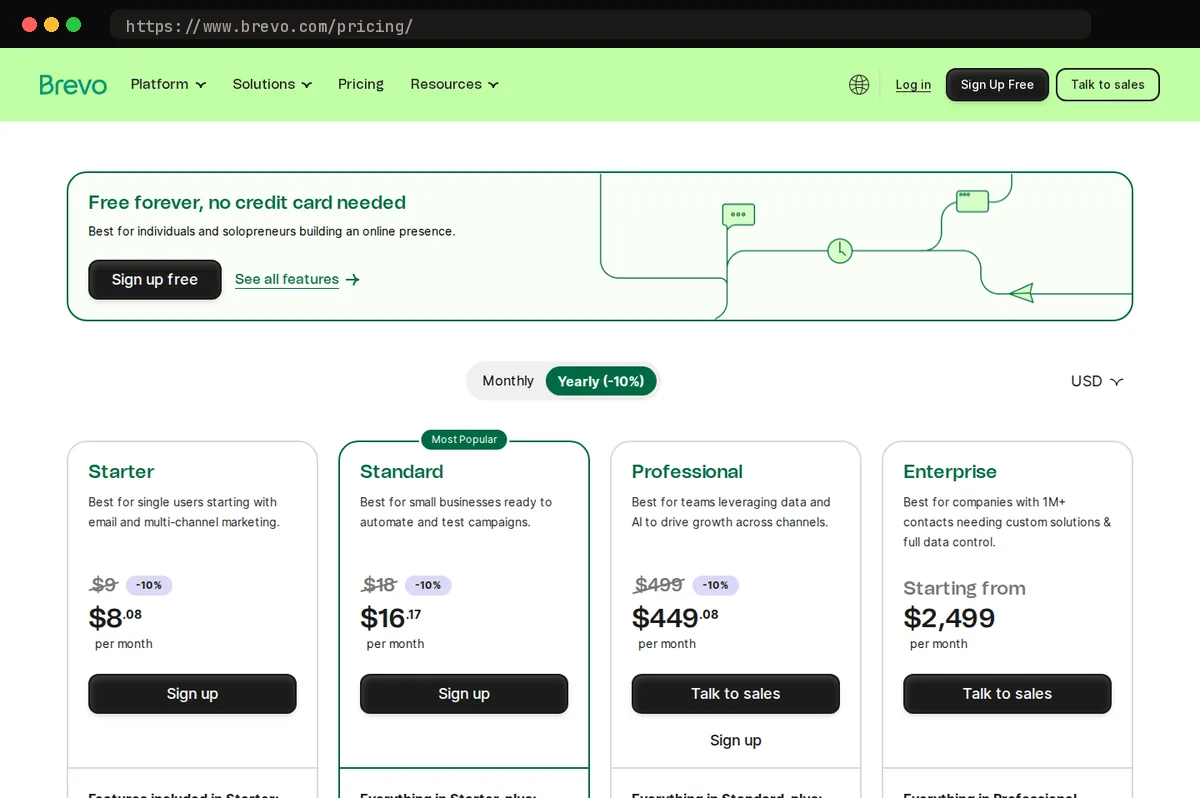
Mailchimp, MailerLite, and Kit all bill by contact count: you pay for the size of your audience, and sending volume is either unlimited or capped generously enough that most senders never hit the ceiling. Brevo flips that around: its pricing page bills by email volume rather than by contact count. That makes Brevo cheap for a large list you mail rarely and expensive for a small list you mail daily, which is the opposite of how the contact-based tools behave.
- BrevoStarterFree: Up to 300 emails per day$9/moFrom 5,000 emails per month
- MailerLiteComfortFree: Up to 250 subscribers, 2…$12/moOur pickUp to 500 subscribers, 5,000 monthly emails'
The contact-based curve is a staircase, not a line. Your bill stays flat until you cross a tier boundary, then jumps. The trap is who gets counted. Mailchimp counts unsubscribed and non-subscribed contacts toward your audience total on paid plans, so people who opted out, or who only ever bought something and never joined your list, still occupy paid seats until you archive or delete them. Mailchimp's own policy: "Subscribed, unsubscribed, and non-subscribed contacts are included in your contact count"; archived, cleaned, and deleted contacts are not. MailerLite bills on active subscribers only, so an unsubscribe lowers your cost instead of quietly preserving it.
The second trap is feature gating. Mailchimp spreads automation depth, send-time optimization, and some reporting across its tiers, so the feature you need may sit one plan up from the contact count you actually have. MailerLite gates less that way, which is part of why it is our pick.
Editor, templates, and landing pages
MailerLite's block editor is the one we reach for first. It loads quickly, the block palette is short enough to scan, and the settings panel stays out of the way until you select a block. Mailchimp's newer editor has closed much of the usability gap, but the interface still carries more chrome, and teams with older campaigns still bounce between its classic and new editors.
On template count, Mailchimp wins. Its catalog is larger and better organized by goal, and its generative AI features, listed as a no-cost add-on on the Standard and Premium plans, generate branded layouts from your logo and colors. If you have no designer and want something presentable in minutes, that is genuinely useful. MailerLite's library is smaller but cleaner, and its templates need less stripping down before they look like your brand instead of a stock design. Kit takes the opposite stance: its editor is built for plain-text, creator-style emails, and anyone wanting image-heavy promotional layouts will find it limiting. Brevo's editor is capable, with the same block mechanics as the others, but it is less polished and its template catalog is thinner.
Landing pages and forms are where the free tiers separate. MailerLite's free plan includes landing pages, pop-ups, embedded forms, and a website builder (1 website and 1 landing page, 3 sign-up forms and pop-ups, 3 automations). Mailchimp's free plan also bundles landing pages and a basic website builder. Kit's free plan includes landing pages and forms. Brevo reserves its landing page builder for paid plans (its pricing page lists Standard from $18/month with 1 landing page included; per its help center, more pages require the Professional plan, which includes 10, with an add-on of 50 more at $250/month, up to two add-ons). For email, forms, and a landing page from one free account, MailerLite is the most complete of the four.
Automation and segmentation depth
MailerLite's automation builder is a drag-and-drop canvas with the triggers most small senders actually use: subscriber joins a group, submits a form, clicks a link, updates a field, or hits a date such as an anniversary. Workflows can start from multiple triggers, so one onboarding sequence can serve a signup form and an imported list at once. Conditional branches, delays, and A/B steps are included, and segments combine group membership, field values, and engagement with and/or logic. Where it stops: deep ecommerce behavior, lead scoring, and anything resembling a sales pipeline.
Mailchimp's Marketing Automation Flows (formerly Customer Journey Builder) is the deeper canvas, branching on purchase behavior, predictive demographics, and store data from a connected Shopify or WooCommerce account. The catch is plan gating: the Free plan gets no flows, Essentials is limited to a single trigger and up to 4 steps with no branching, and conditional branching and longer flows require Standard or above (up to 200 flows, 200 steps, 3 triggers, and conditional and percentage splits).
Kit, formerly ConvertKit, builds everything around tags, and its visual automation editor excels at creator funnels: tag on purchase, tag on link click, route accordingly. It is thin on ecommerce data and offers no multi-channel steps.
Brevo adds what none of the others do: CRM deal stages, SMS, and WhatsApp as workflow steps, plus lead scoring. Pick it if your nurture must cross channels; otherwise its builder is less tidy than MailerLite's, and MailerLite remains our pick for email-first teams.
Deliverability, integrations, and support
All four services sign outgoing mail with SPF and DKIM once you add their records to your domain's DNS, and all four now require authenticated sending domains to comply with Google and Yahoo's bulk-sender rules. The practical difference is how much hand-holding you get. MailerLite's domain authentication wizard walks you through the records and verifies them in place; Mailchimp's does the same but buries DMARC guidance a layer deeper. Neither creates a DMARC record for you, so plan on writing that policy yourself.
On sender reputation, MailerLite reviews new accounts manually before letting them send, which keeps spammers off its shared IPs and is the main reason we trust its inbox placement for small lists. Mailchimp relies more on automated compliance scoring after the fact. Dedicated IPs are available from both for high-volume senders, but only on upper plans: MailerLite offers one on request to accounts with an authenticated domain sending at least 50,000 emails a week, with pricing through its customer success team, and Mailchimp publishes no figure for its marketing plans, though its Transactional add-on (Standard and Premium only) lists a dedicated IP at $29.95/month. Brevo and Kit also offer them at volume.
Integrations favor Mailchimp. Its directory is the broadest by a wide margin, and most SaaS products ship a native Mailchimp connector first. Brevo's advantage is transactional SMTP and an API in the same account, so one vendor covers marketing and system mail. MailerLite and Kit lean on Zapier plus native Shopify, WooCommerce, and Stripe connectors, which covers most small businesses but not every CRM.
Support tips back toward our pick. MailerLite gives its Power plan 24/7 live chat and email, while the entry Comfort plan gets email support only (live chat opens up from 50,000 subscribers) and the free plan gets the knowledge base; Mailchimp limits the Free plan to 30 days of email support, gives Essentials and Standard 24/7 email and chat, and reserves phone and priority support for Premium.
Migration and switching costs
Moving a list is the easy part. Export subscribers from Mailchimp as CSV, including the tags and merge-field columns, then import into MailerLite, Kit, or whichever tool you pick, mapping fields before you confirm. Tags import cleanly as long as the names match; Mailchimp "groups" and audiences do not have a one-to-one equivalent, so decide up front whether each becomes a group, a segment, or a tag.
What does not transfer: automation history, engagement scoring and member ratings, open and click records, and much template formatting. Automations must be rebuilt by hand, and anyone mid-sequence restarts from step one unless you tag them by stage first. Templates built in Mailchimp's drag-and-drop editor need redesign; HTML templates paste over with cleanup.
MailerLite publishes migration guides and self-service import tools; the free plan can migrate up to 250 subscribers, and larger migrations require a paid plan. Kit runs a concierge migration for creators on paid plans with 5,000 or more subscribers (its migrations page has also cited 10,000, so check the current threshold), which matters if your automations are complex. Mailchimp provides no equivalent for inbound moves.
If you change sending domains, warm up gradually: send first to your most engaged segment, then widen over two to four weeks while watching bounce and complaint rates. Keep Mailchimp live during that window, sending time-sensitive campaigns from the old account until deliverability on the new one is stable, then let the old plan lapse. Budget roughly a month of overlap, more if you rely on long automations that need to drain before shutdown. For most small teams, MailerLite's import flow and assisted setup make this the least painful landing spot.
At a glance
| Tool | Strengths | Tradeoffs |
|---|---|---|
| MailerLite | Clean, fast editor; generous free plan with automation included; honest contact counting; live chat support on the Power plan (email-only on Comfort); landing pages, forms, and a simple website builder bundled; strong value as lists grow. | Smaller integration catalog than Mailchimp; approval process on signup can delay new accounts; reporting is lighter; no native CRM or SMS. |
| Mailchimp | Largest integration ecosystem; mature template library and brand tooling; widely known by agencies and freelancers; strong e-commerce reporting; advanced segmentation and predictive features on upper tiers. | Bills for unsubscribed and non-subscribed contacts; key automation features gated behind Standard and Premium plans; free plan has been cut back repeatedly; support on the Free plan is email-only and ends after 30 days; phone support is Premium-only; price climbs steeply with list size. |
| Brevo | Unlimited contacts with billing by email volume; built-in CRM, SMS, WhatsApp, and live chat; transactional email and SMTP relay in the same account; good fit for teams that want one tool for marketing and operational mail. | Daily send cap on the free plan; editor and templates less refined; interface feels busier; Brevo's pricing page lists logo removal as a paid add-on on the Starter plan (not shown from Standard up) and advanced reports and analytics as a Standard-plan feature. |
| Kit | Built for creators and newsletter businesses; excellent tag-based automation and subscriber-centric model; strong deliverability reputation for plain-text sends; creator network and paid-newsletter tooling built in. | Design-heavy marketing emails are not its strength; pricier per subscriber than MailerLite at mid-sized lists; thin e-commerce and B2B CRM features; fewer templates and landing page options. |
Bottom line
Our pick is MailerLite. Its free plan and entry-level paid tiers (Free at 250 subscribers, Comfort from $12/month, Power from $25/month) cover what most small senders actually do: a few lists, a handful of automations, a signup form, and a monthly newsletter. The editor is faster to work in, the automation builder is easier to read, and the bill stays predictable as your list grows. Mailchimp's advantage is breadth: deeper integrations, more reporting, and a larger ecosystem of templates and agencies that know it. The main caveat is that MailerLite's approval process is stricter at signup, so have a working site and a clear sending purpose ready before you commit a domain to it.
Related guides
This article contains affiliate links. We may earn a commission on qualifying purchases at no extra cost to you. Our recommendations are independent and research-driven, and we say when a pick is not hands-on.
Test Picked Editorial
Edited by Adam Ryan. Gear picks come from equipment running in his own homelab and workshop. Software picks are researched comparisons.


